Build Apps with AI - For CEOs
🚀 From Idea to Production in Minutes
Transform your business ideas into live, compliant applications using natural language. Quome Studio is the fastest way for CEOs to validate concepts, create internal tools, and deliver customer solutions - without hiring developers or managing infrastructure.
Executive Benefits:
- Validate ideas fast - Build and test concepts in minutes, not months
- Reduce development costs - 90% cost reduction vs traditional development
- Built-in compliance - HIPAA, SOC 2 ready for regulated industries
- No technical debt - Professional code that scales with your business
Perfect for executives who want to move at the speed of thought and maintain competitive advantage through rapid innovation.
Quick start
- Describe your app: Tell Quome what you want to build in plain English
- Preview the result: Review the generated application
- Deploy instantly: Click "Deploy" to make your app live
- Share the URL: Your app is immediately accessible online
Watch Quome Studio in Action
How it works
Quome Studio uses AI to convert your description into a complete application with:
- Frontend UI - React-based user interface
- Backend API - FastAPI server with authentication
- Database - SQLite database with your data model
- Deployment - Container deployed to the cloud
- Security - HTTPS, encryption, and compliance features
Executive Prompt Engineering
The quality of your generated application directly correlates with the clarity of your business requirements. Think like you're briefing your executive team - be specific about outcomes, not technical implementation.
Prompt Quality Comparison
Frame Business Outcomes, Not Features
Effective CEO-Level Prompt:
"Build a patient portal that improves our clinic's efficiency by allowing patients to schedule appointments, view test results, and communicate with their care team. We need to reduce front-desk calls by 60% and improve patient satisfaction scores."
Ineffective Feature-List Prompt:
"Make a healthcare app with scheduling and messaging"
Include Revenue and Compliance Context
Strategic Business Prompt:
"Create a lead management system for our B2B sales team. We need to track $2M+ deals through our pipeline, ensure GDPR compliance for EU prospects, and integrate with our existing Salesforce for reporting to investors."
Vague Generic Request:
"Build a CRM system"
Specify Scale and Growth Expectations
Growth-Oriented Prompt:
"Design an inventory management system that can handle our current 500 SKUs but scale to 10,000 as we expand into new markets. Include real-time stock alerts and integrate with our accounting system for investor reporting."
Limited Scope Request:
"Track our inventory"
Industry-Specific Prompt Templates
Revenue Operations
Build a revenue tracking dashboard that consolidates data from our sales,
marketing, and customer success teams. I need real-time visibility into our
monthly recurring revenue, customer acquisition costs, and churn metrics
for board meetings.

Success Metrics:
- Reduce reporting time by 75%
- Increase forecast accuracy to 95%
- Enable daily revenue visibility
Healthcare & Compliance
Create a HIPAA-compliant patient management system that streamlines our
practice operations. Patients should be able to book appointments, complete
intake forms, and receive treatment summaries. We need full audit trails
for compliance audits.

Compliance Requirements:
- HIPAA-compliant data handling
- Complete audit trail functionality
- Secure patient communication
Operations Efficiency
Design a project management system for our consulting firm that tracks
billable hours, client deliverables, and team capacity. I need visibility
into project profitability and resource allocation for better business decisions.

Business Outcomes:
- Increase billable utilization by 20%
- Improve project margin visibility
- Reduce administrative overhead
Example applications
CRM System
Build a customer relationship management system for a consulting firm.

Features needed:
- Contact management with companies and individual contacts
- Deal pipeline tracking with stages (lead, qualified, proposal, closed)
- Task management assigned to team members
- Document storage for contracts and proposals
- Revenue reporting and forecasting

User roles:
- Sales reps can manage their own deals and contacts
- Sales managers can view all deals and run reports
- Admins can manage users and company settings

The app should send email reminders for follow-up tasks and integrate with our existing email system.
Healthcare Dashboard
Create a patient management system for a small medical practice.

Requirements:
- Patient records with demographics, medical history, and visit notes
- Appointment scheduling with calendar view
- Insurance information and billing status
- Prescription tracking and refill requests
- Lab results and document uploads
- HIPAA compliance with audit logging

User access:
- Doctors can view all patient data and create visit notes
- Nurses can schedule appointments and update basic info
- Administrative staff handle billing and insurance
- Patients can view their own records and request appointments

Must be secure and compliant with healthcare regulations.
Inventory Management
Build an inventory management system for an e-commerce business.

Core features:
- Product catalog with SKUs, descriptions, and pricing
- Stock level tracking with low-stock alerts
- Purchase orders to suppliers with approval workflow
- Sales order processing and fulfillment
- Barcode scanning for receiving and picking
- Multi-location warehouse support

Integrations:
- Shopify integration for order import
- QuickBooks for accounting sync
- Email notifications for stock alerts
- Reporting dashboard for inventory analytics

The system needs role-based access for warehouse staff, managers, and accounting.
Deployment
When you're ready to deploy your app:
- Preview first - Test your app in the preview environment
- Click Deploy - Quome handles containerization, SSL, and DNS
- Get your URL - Your app gets a unique URL like
myapp-org123.quome.cloud - Monitor status - Track deployment progress in real-time
Deployment typically takes 1-3 minutes. Your app includes:
- Automatic SSL certificate
- Database backups
- Monitoring and logging
- Security scanning
Making changes
You can update your app anytime:
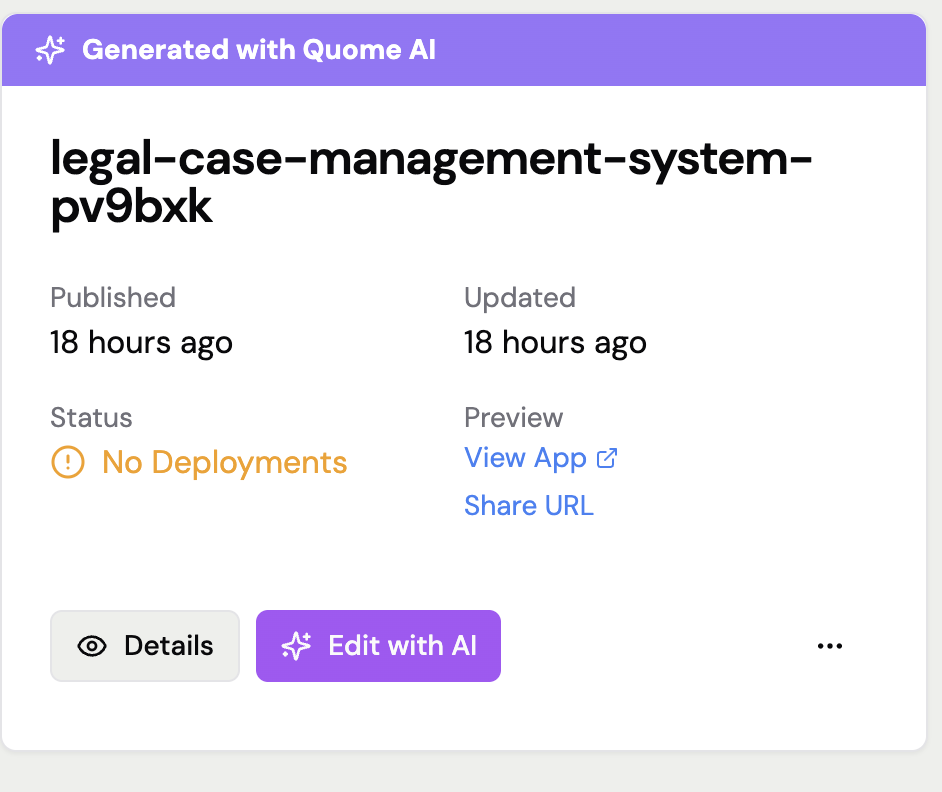
- Go to My Apps - Find your deployed application
- Click "Edit with AI" - Describe what you want to change
- Preview changes - See how your modifications look
- Redeploy - Updates go live in minutes
Tips for updates
- Make small changes - Update one feature at a time for best results
- Be specific - Clearly describe what should be different
- Test thoroughly - Preview changes before deploying
Limitations
Quome Studio works best for:
- Business applications and dashboards
- CRUD (Create, Read, Update, Delete) workflows
- Standard web application patterns
Current limitations:
- No mobile app generation (web apps work on mobile)
- Limited to FastAPI/React technology stack
- Complex integrations may require manual configuration
- Real-time features (chat, live updates) are limited
Getting help
Having trouble with your app generation?
- Check the preview - Errors are usually visible before deployment
- Try rephrasing - Different wording can produce better results
- Start simple - Build basic functionality first, then add features
- Contact support - Email support@quome.site with your prompt
Ready to build your first app?